Specification Manager
With the Specification Manager, you can create a customized product search for your users, or just a specification table fit precisely for your products.
Creating Specifications with the Specification Manager
To add a new specification type, use the table on the left called "NEW," and it will be added to the table on the right, where you can modify it at any time. Each possible specification value should be followed by a comma.
For example: You may add a specification type called "Movement" and the specification values could include "Automatic, Quartz, Mechanical".
The order number determines the number the specification types will appear either on a search page or a product page. At any time, you may disable a specification type for the frontend, but you will still be able to modify and access it from the product page.
After you have added specification types and values using the Specification Manager, you may access these through the product page where you can select each value.
Assigning Specifications from the Specification Manager
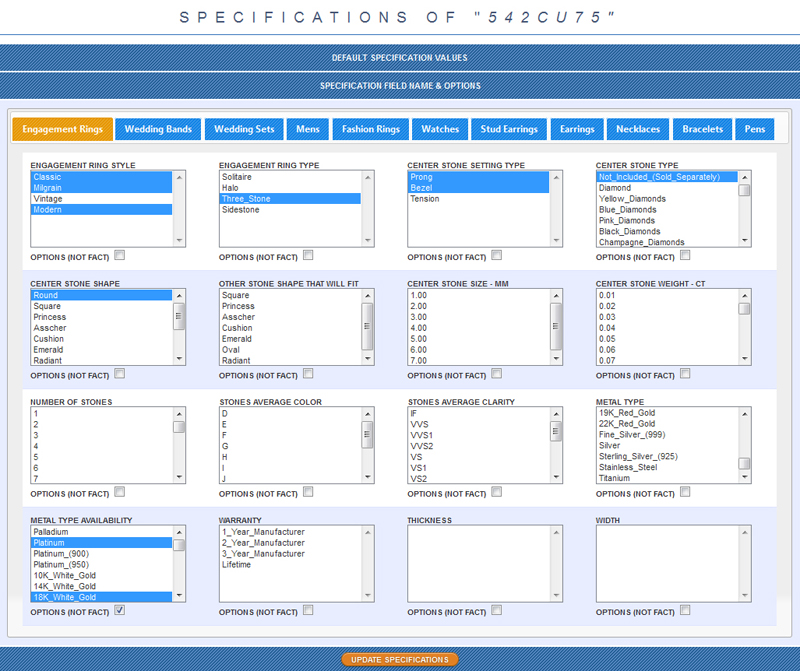
In order to assign the specification values that you have created, navigate to a product page and find the Product Specifications Table, second table from the top. This table displays a series of multiple select menus, which include the types and values that you have created. To select a value, click on one of the options in the field. To select multiple values in a single field, hold down the alt key while clicking on each option. Specifications that have been selected on the product are highlighted in blue.
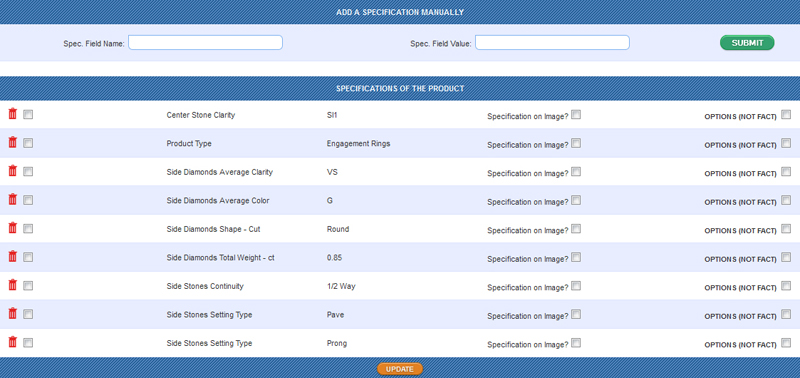
All specifications added to the product will appear in the proceeding table, where you have the option to delete them. To delete specifications, check each box next to the
 icon for each specification you would like deleted, then submit the "Update" button.
Note that in order to change a watch from being Movement: Automatic to Movement: Quartz, you must delete the old specification entry from this table.
Otherwise, if you only change the select menu above and update the table, the product will have both Automatic and Quartz listed in its specifications.
icon for each specification you would like deleted, then submit the "Update" button.
Note that in order to change a watch from being Movement: Automatic to Movement: Quartz, you must delete the old specification entry from this table.
Otherwise, if you only change the select menu above and update the table, the product will have both Automatic and Quartz listed in its specifications.